
Parsyra Conversion Examples,
Unedited
Every converter website says its output is clean. This page shows you ours instead. Below are eleven Parsyra conversion examples produced by the exact code that runs when you drop a file on the homepage: plain and financial PDFs, a scanned delivery note, a maths handout, a webpage, a note full of LaTeX, an engineering note full of Mermaid diagrams, a PPTX deck and an Excel workbook — with the report and the handout each compared twice, once through standard Parsyra conversion and once through High-accuracy OCR. Nothing was retouched. Where the result is strong we say so, and where it falls apart — PDF tables, equations, flattened slide tables — we show the failure and explain it.
All input files were authored by us for this page, so you can compare them freely. Every output below is the verbatim result of a single conversion run, with nothing corrected.
Eleven Parsyra Conversion Examples
Pick a document type. The left panel is the input we fed in; the right panel is the Markdown that came out, byte for byte. Green notes are what held up, amber notes are what to check before you ship the result. Between them these Parsyra conversion examples cover the formats people actually bring us.
Product memo (.pdf, digital-born)
A two-page release memo exported straight from an editor: title, subtitle, four sections, two bullet lists. The friendliest kind of PDF — born digital, single column, real text layer.
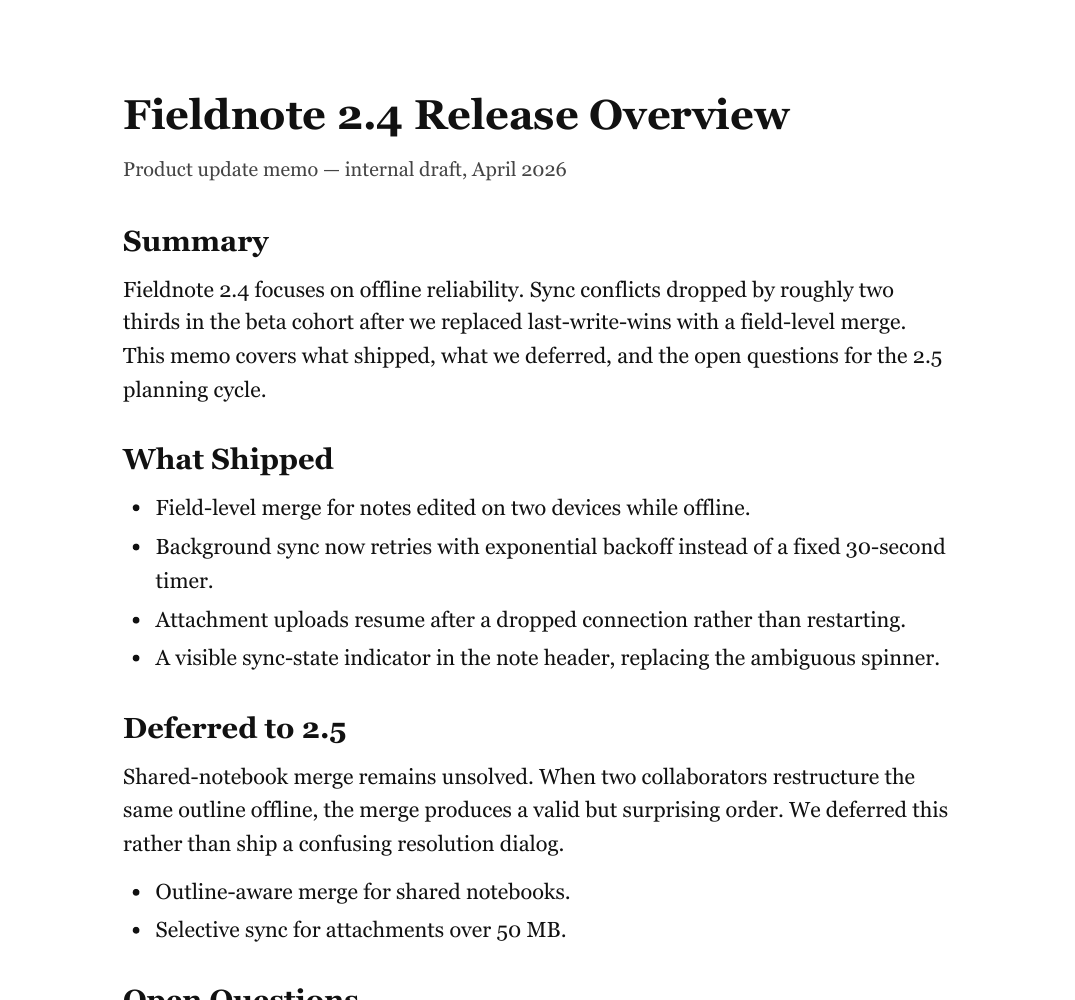
# Fieldnote 2.4 Release Overview

Product update memo — internal draft, April 2026

## Summary

Fieldnote 2.4 focuses on offline reliability. Sync conflicts dropped by roughly two thirds in the beta cohort after we replaced last-write-wins with a field-level merge. This memo covers what shipped, what we deferred, and the open questions for the 2.5 planning cycle.

## What Shipped

Field-level merge for notes edited on two devices while offline.

Background sync now retries with exponential backoff instead of a fixed 30-second timer.

Attachment uploads resume after a dropped connection rather than restarting.

A visible sync-state indicator in the note header, replacing the ambiguous spinner.

## Deferred to 2.5

Shared-notebook merge remains unsolved. When two collaborators restructure the same outline offline, the merge produces a valid but surprising order. We deferred this rather than ship a confusing resolution dialog.

Outline-aware merge for shared notebooks.

Selective sync for attachments over 50 MB.

## Open Questions

The beta cohort skews toward single-device users, so the conflict numbers above may understate multi-device behavior. We plan to re-run the analysis once the 2.4 rollout reaches half of the multi-device population.
- ✓The title and every section heading were detected from font size alone and mapped to # and ## correctly.
- ✓Paragraph flow reads top to bottom exactly as the memo does; nothing was dropped or reordered.
- ✓The header and footer never leak into the body text.
- ⚠The bullet lists came back as plain paragraphs — this file's text layer stores no bullet glyphs, so list detection had nothing to key on.
- ⚠Only two heading levels exist (# and ##); a deeply nested report flattens.
Ready to paste into a wiki or prompt after a ten-second skim; re-add list dashes if you need them.
recommended setup › Standard Parsyra run — no extra options needed; the source is processed temporarily and deleted afterward.
Quarterly results with tables (.pdf)
A results summary with two ruled tables — revenue by segment and operating costs. This is the case the honest answer matters most for: PDF stores a table as positioned glyphs and ruled lines, with nothing marking where a cell begins.
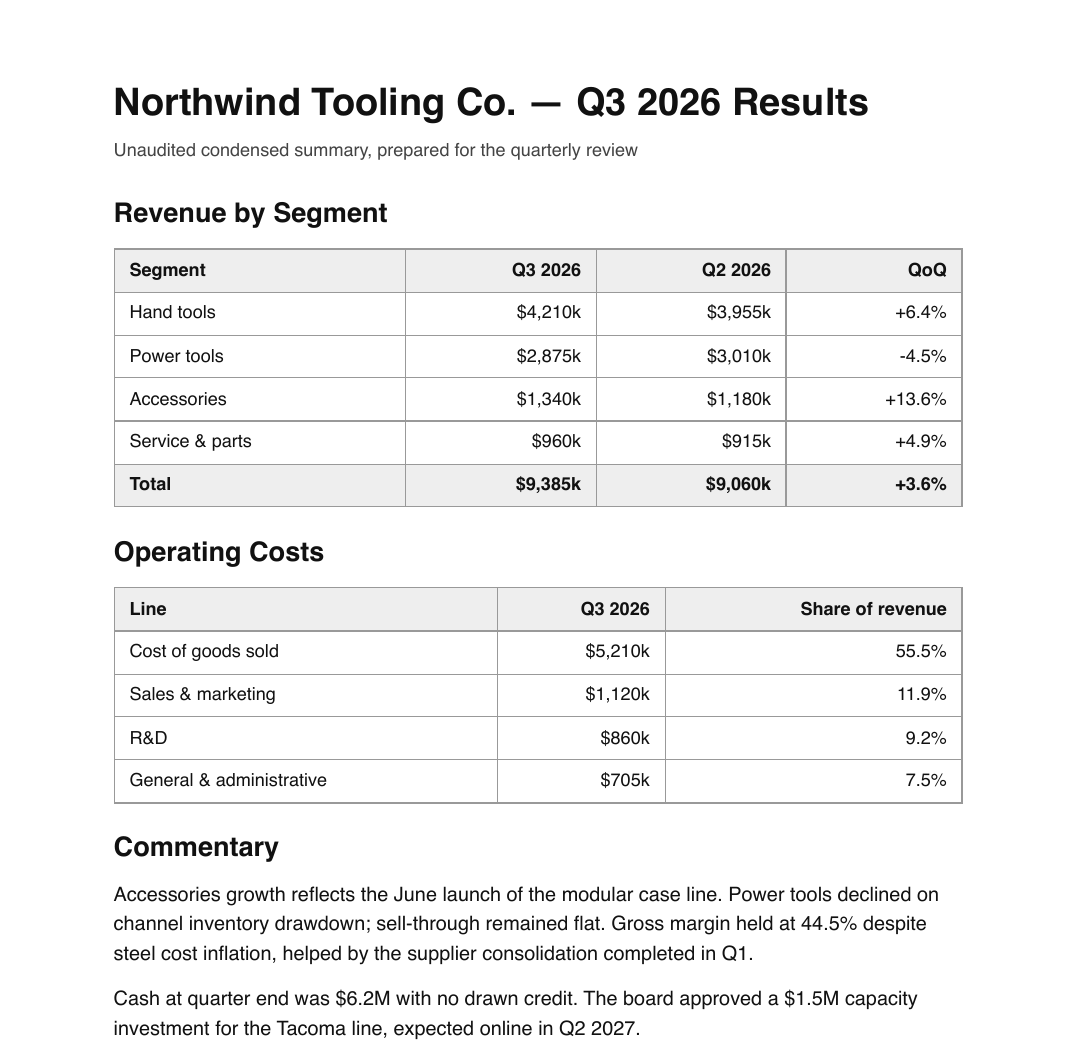
# Northwind Tooling Co. — Q3 2026 Results

Unaudited condensed summary, prepared for the quarterly review

## Revenue by Segment

Segment

Q3 2026 Q2 2026 QoQ Hand tools $4,210k $3,955k +6.4%

Power tools

$2,875k $3,010k -4.5%

Accessories

$1,340k $1,180k +13.6% Service & parts $960k $915k +4.9%

Total

$9,385k $9,060k +3.6%

## Operating Costs

Line

Q3 2026

Share of revenue Cost of goods sold $5,210k

## 55.5%

Sales & marketing

$1,120k

## 11.9%

R&D

$860k

## 9.2%

General & administrative

$705k

## 7.5%

## Commentary

Accessories growth reflects the June launch of the modular case line. Power tools declined on channel inventory drawdown; sell-through remained flat. Gross margin held at 44.5% despite steel cost inflation, helped by the supplier consolidation completed in Q1.

Cash at quarter end was $6.2M with no drawn credit. The board approved a $1.5M capacity investment for the Tacoma line, expected online in Q2 2027.
- ✓Document title, section headings and the prose commentary all survive cleanly.
- ✓Every number is present and correct — nothing was hallucinated or dropped, because nothing was reinterpreted.
- ⚠The tables are the honest failure. Rows are split into cells only where the horizontal gap is wide enough; here the gaps between the numeric columns are about 70pt, under the cutoff, so the three figures fuse into one run of text and the column boundaries are gone.
- ⚠An isolated percentage like 55.5% gets promoted to a heading, because a number followed by a dot reads like the marker of a numbered list. Signed values such as +6.4% escape it.
- ⚠If the tables are the point of your document, convert the source spreadsheet instead — or see the next tab, where the same page read as a scan comes back as real tables.
Trust the prose, rebuild the tables — from the XLSX if you have it, or compare the next tab if your reports arrive as scans.
recommended setup › Standard Parsyra run for the prose; switch to the Excel converter or High-accuracy OCR when the tables matter.
The same results summary, scanned and recognised
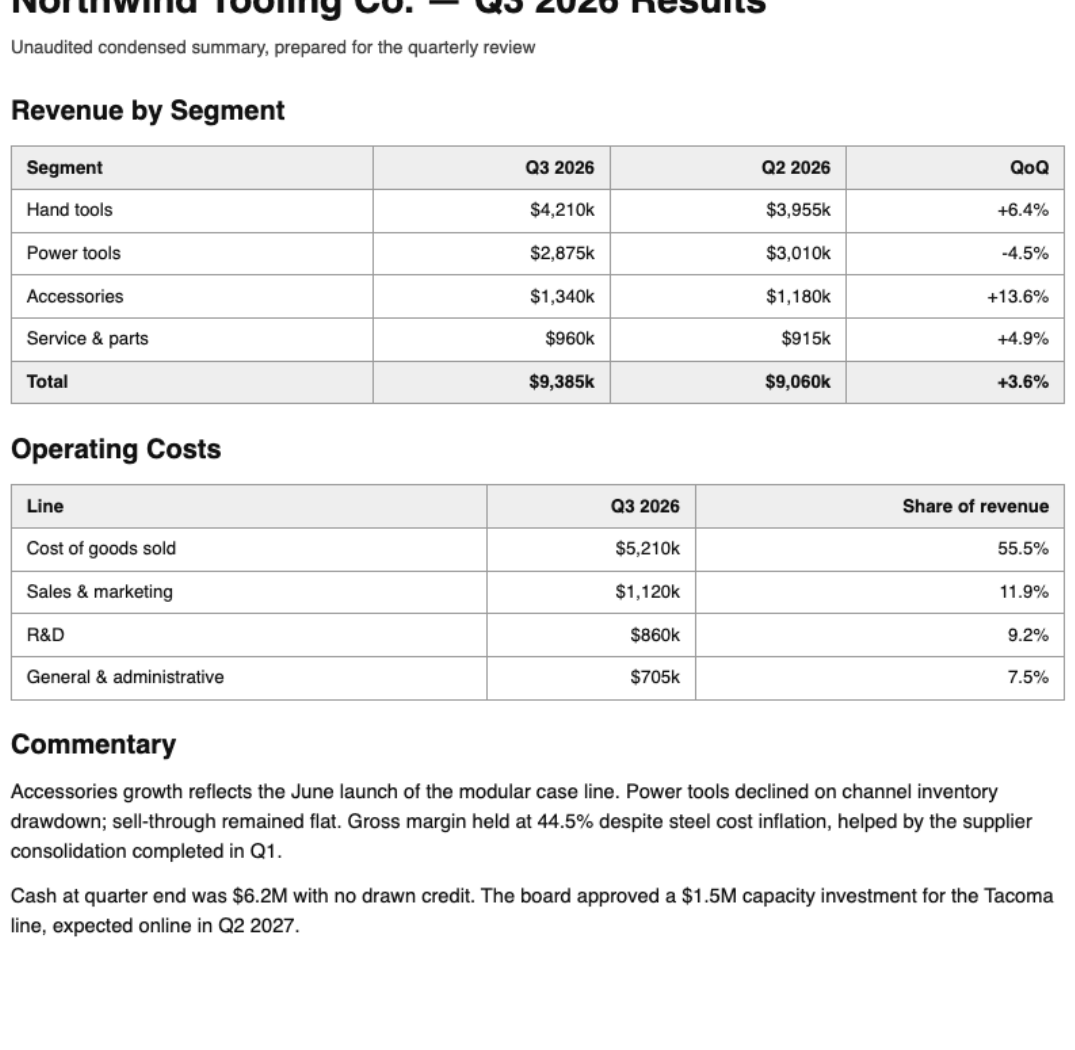
The identical report from the previous tab, flattened to an image so it carries no text layer. That is what puts it on the AI recognition path, and it answers the question the previous tab raises: what happens to these tables when the page is read visually instead of by coordinates.
# Northwind Tooling Co. — Q3 2026 Results

Unaudited condensed summary, prepared for the quarterly review

## Revenue by Segment

|  Segment | Q3 2026 | Q2 2026 | QoQ  |
| --- | --- | --- | --- |
|  Hand tools | $4,210k | $3,955k | +6.4%  |
|  Power tools | $2,875k | $3,010k | -4.5%  |
|  Accessories | $1,340k | $1,180k | +13.6%  |
|  Service & parts | $960k | $915k | +4.9%  |
|  **Total** | **$9,385k** | **$9,060k** | **+3.6%**  |

## Operating Costs

|  Line | Q3 2026 | Share of revenue  |
| --- | --- | --- |
|  Cost of goods sold | $5,210k | 55.5%  |
|  Sales & marketing | $1,120k | 11.9%  |
|  R&D | $860k | 9.2%  |
|  General & administrative | $705k | 7.5%  |

## Commentary

Accessories growth reflects the June launch of the modular case line. Power tools declined on channel inventory drawdown; sell-through remained flat. Gross margin held at 44.5% despite steel cost inflation, helped by the supplier consolidation completed in Q1.

Cash at quarter end was $6.2M with no drawn credit. The board approved a $1.5M capacity investment for the Tacoma line, expected online in Q2 2027.
- ✓Both tables come back as complete pipe tables, and all 23 figures land in the right cell — the same content the previous tab reduces to loose lines.
- ✓The emphasised total row survives as **Total** / **$9,385k**, because visual weight is something a reader of the rendered page can see and a reader of coordinates cannot.
- ✓The stray 55.5% heading disappears: once the percentage is a cell rather than a line of its own, nothing mistakes it for a list marker.
- ⚠This route opens only for PDFs with no text layer. A born-digital report like the one in the previous tab cannot be pushed through it — you would have to export or print it to an image first.
- ⚠Cells carry a little extra padding inside the pipes, so tidy the spacing if you are diffing the Markdown.
- ⚠Page images go to a server and each page uses OCR quota, so this is the deliberate, metered choice rather than the standard conversion.
If your financial reports arrive as scans, this is the tab that matters: unusable text lines become a table you can paste straight into a spreadsheet or a prompt.
recommended setup › Turn on "Automatic OCR for scanned PDFs" — sign-in required; 10 pages/month free, 500 on Pro.
Scanned delivery note (image-only .pdf)
A photographed-style delivery note: the PDF holds one image per page and no text layer at all, so standard Parsyra extraction finds zero characters. The widget flags it as a likely scan and offers High-accuracy OCR, which sends page images for visual recognition after you choose it.
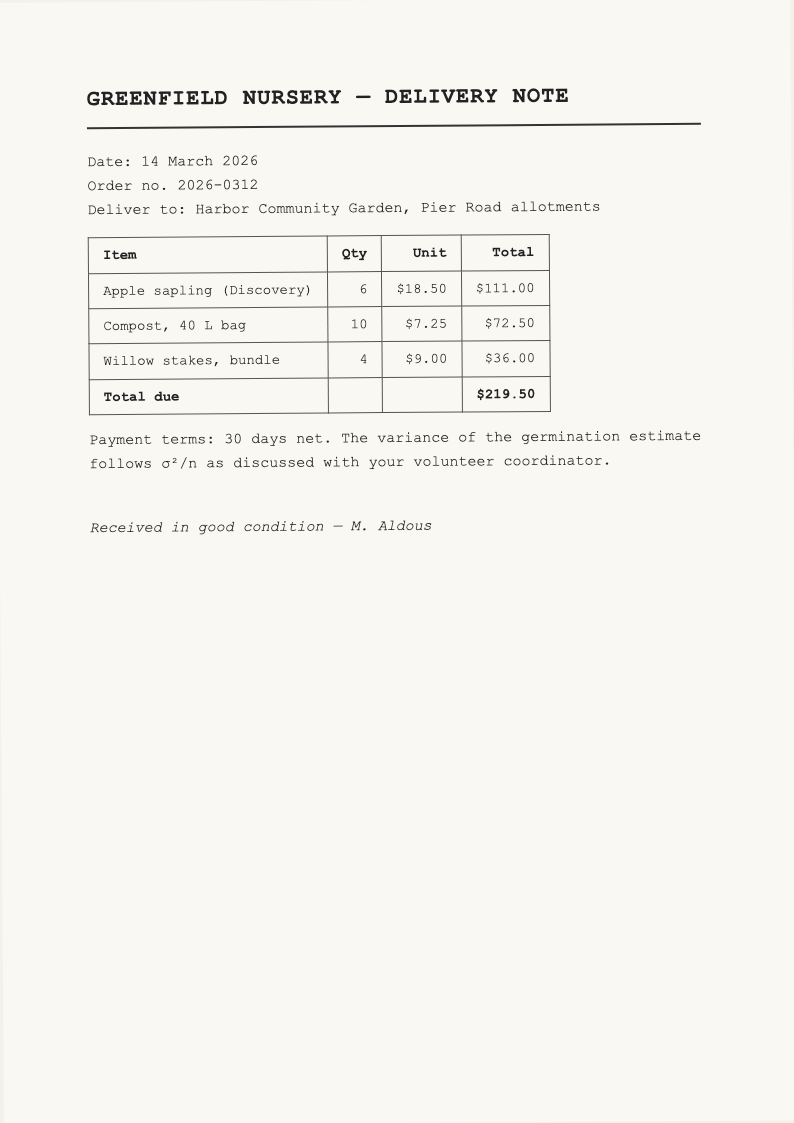
# GREENFIELD NURSERY — DELIVERY NOTE

Date: 14 March 2026

Order no. 2026-0312

Deliver to: Harbor Community Garden, Pier Road allotments

|  Item | Qty | Unit | Total  |
| --- | --- | --- | --- |
|  Apple sapling (Discovery) | 6 | $18.50 | $111.00  |
|  Compost, 40 L bag | 10 | $7.25 | $72.50  |
|  Willow stakes, bundle | 4 | $9.00 | $36.00  |
|  Total due |  |  | $219.50  |

Payment terms: 30 days net. The variance of the germination estimate follows σ²/n as discussed with your volunteer coordinator.

Received in good condition — M. Aldous
- ✓The table came back as a real Markdown pipe table — from an image, with every quantity and price in the right cell. Compare that with the financial-report tab, where the same kind of table dissolves into text lines.
- ✓Reading order is correct despite the page being scanned at a slight angle, and the heading was recognised as a heading.
- ✓Even the inline math survived: σ²/n reads as written, which is why OCR is also the answer for equation-heavy pages.
- ⚠The standard Parsyra path returns nothing at all for this file — an empty result is the signal that a PDF is a scan, not a bug.
- ⚠Cells carry a little extra padding inside the pipes, so tidy the spacing if you are diffing the Markdown.
- ⚠This example uses the optional OCR path: page images go to a recognition service and consume quota — 10 pages a month free, 500 on Pro.
The strongest argument for OCR: an unreadable scan becomes a clean, structured table in one pass.
recommended setup › Turn on "Automatic OCR for scanned PDFs" — sign-in required; 1 page of quota per page converted.
Math handout with equations (.pdf)
A seminar handout with display equations — subscripts, superscripts, summation signs. Equations in a text-layer PDF are stored as scattered positioned glyphs, and this example shows exactly what that means for the output.
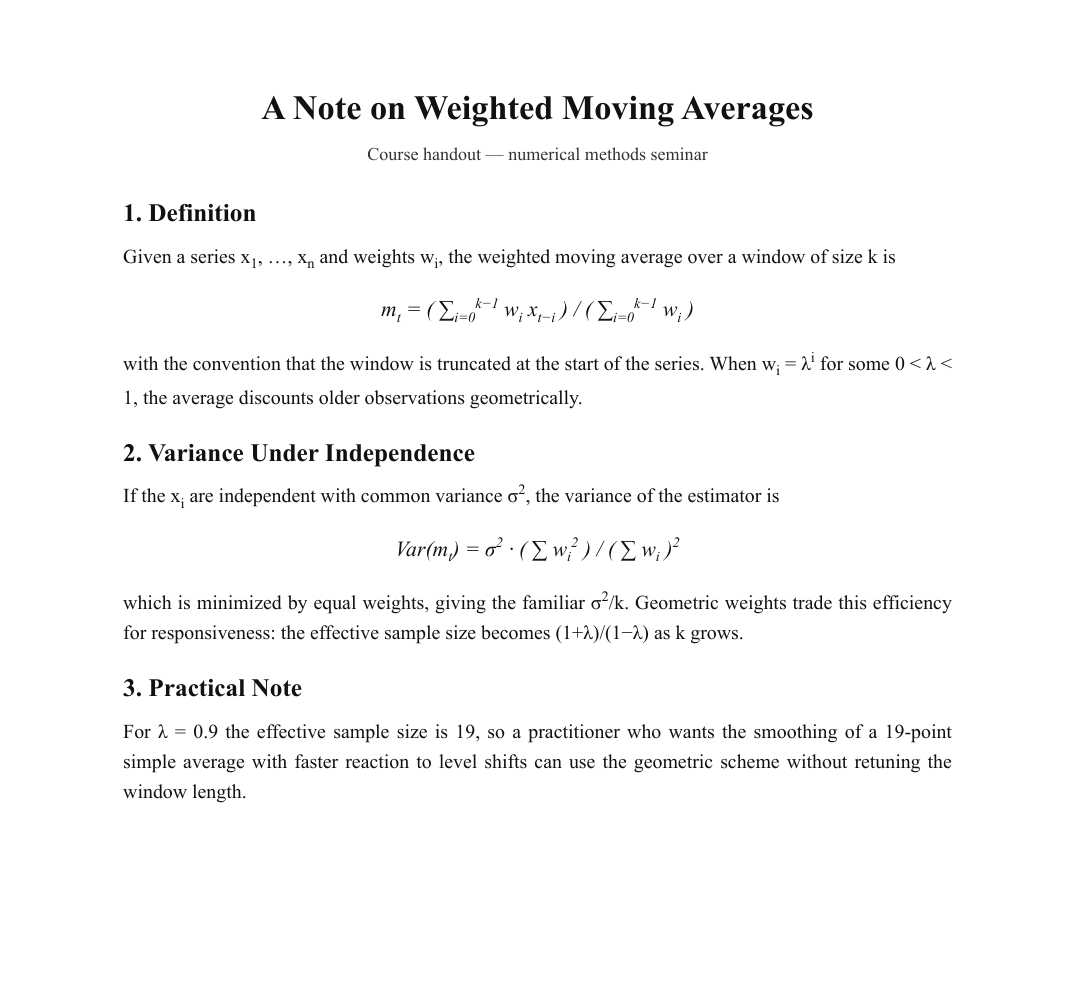
# A Note on Weighted Moving Averages

Course handout — numerical methods seminar

## 1. Definition

Given a series x , …, x and weights w , the weighted moving average over a window of size k is

1 n i

k−1

k−1

m = ( ∑ w x ) / ( ∑ w )

t i=0 i t−i i=0 i

i

with the convention that the window is truncated at the start of the series. When w = λ for some 0 < λ <

i

1, the average discounts older observations geometrically.

## 2. Variance Under Independence

2

If the x are independent with common variance σ , the variance of the estimator is

i

2 2 2

Var(m ) = σ · ( ∑ w ) / ( ∑ w )

t i i

2

which is minimized by equal weights, giving the familiar σ /k. Geometric weights trade this efficiency for responsiveness: the effective sample size becomes (1+λ)/(1−λ) as k grows.

## 3. Practical Note

For λ = 0.9 the effective sample size is 19, so a practitioner who wants the smoothing of a 19-point simple average with faster reaction to level shifts can use the geometric scheme without retuning the window length.
- ✓Headings, prose and inline Greek letters (λ, σ) survive — the running text between equations is fully usable.
- ✓Nothing pretends to be LaTeX that isn't: you can see exactly what you'd be editing.
- ⚠Display equations disintegrate: subscripts and superscripts detach onto their own lines (the stray '1 n i' under the first formula is the subscripts of x1, xn, wi).
- ⚠The standard Parsyra path produces no LaTeX at all. The next tab is this same handout run through High-accuracy OCR, where the equations come back as real LaTeX — that is the route for maths-heavy documents.
- ⚠Equation-adjacent line order can shuffle, so verify any formula you copy.
Fine for the prose around the maths; for the equations themselves, see the next tab.
recommended setup › Standard Parsyra run for text; High-accuracy OCR when you need the equations as LaTeX.
The same handout, scanned and run through AI OCR
Identical page to the previous tab, but flattened to an image so it has no text layer — which is what puts it on the AI recognition path. This High-accuracy OCR route is designed for cases where equations need to come back as LaTeX rather than scattered glyphs.
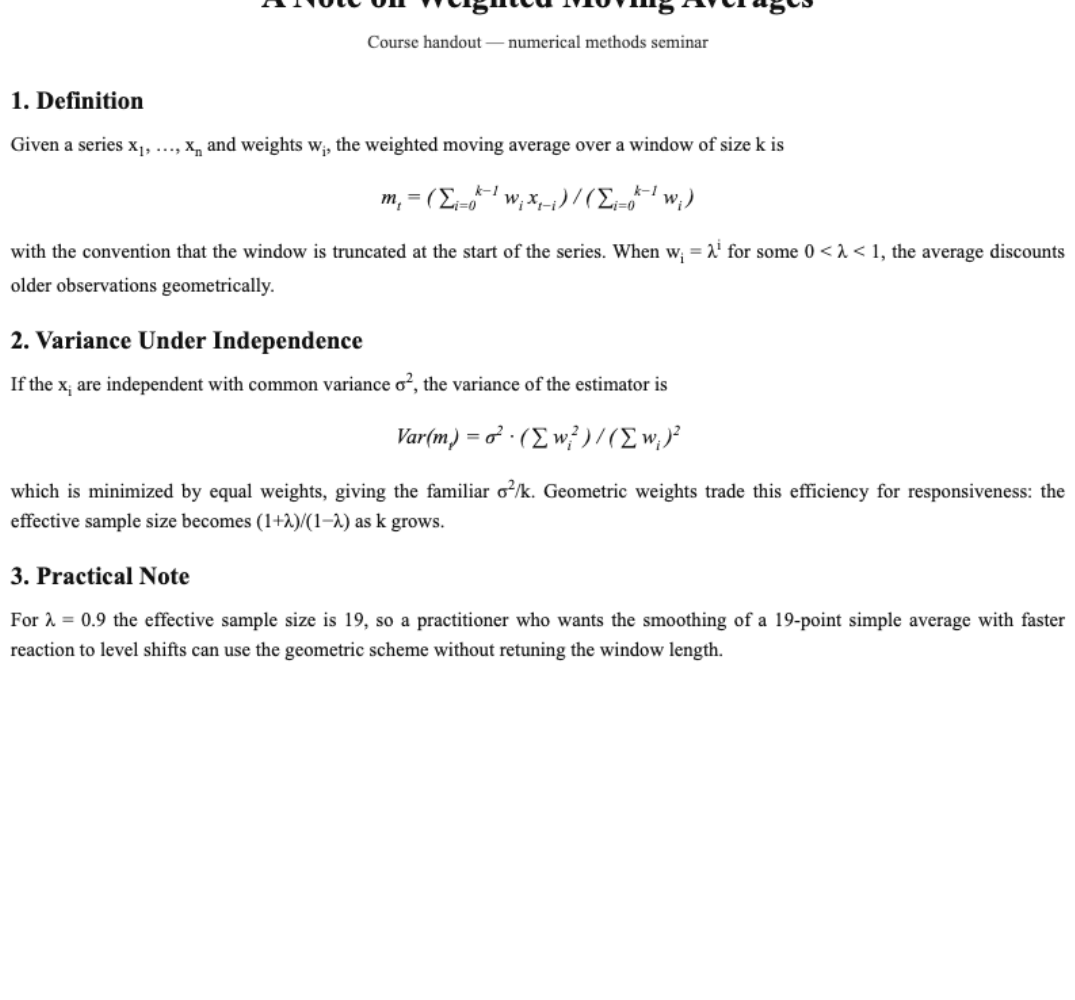
# A Note on Weighted Moving Averages

Course handout — numerical methods seminar

## 1. Definition

Given a series $x_1, \dots, x_n$ and weights $w_i$, the weighted moving average over a window of size $k$ is

$$m_t = (\sum_{i=0}^{k-1} w_i x_{t-i}) / (\sum_{i=0}^{k-1} w_i)$$

with the convention that the window is truncated at the start of the series. When $w_i = \lambda^i$ for some $0 < \lambda < 1$, the average discounts older observations geometrically.

## 2. Variance Under Independence

If the $x_i$ are independent with common variance $\sigma^2$, the variance of the estimator is

$$Var(m_t) = \sigma^2 \cdot (\sum w_i^2) / (\sum w_i)^2$$

which is minimized by equal weights, giving the familiar $\sigma^2/k$. Geometric weights trade this efficiency for responsiveness: the effective sample size becomes $(1+\lambda)/(1-\lambda)$ as $k$ grows.

## 3. Practical Note

For $\lambda = 0.9$ the effective sample size is 19, so a practitioner who wants the smoothing of a 19-point simple average with faster reaction to level shifts can use the geometric scheme without retuning the window length.- ✓Both display equations came back as complete LaTeX. The formula the previous tab shattered reads $$m_t = (\sum_{i=0}^{k-1} w_i x_{t-i}) / (\sum_{i=0}^{k-1} w_i)$$ — subscripts, superscripts and summation bounds all in place.
- ✓Inline math is marked up too: $x_1, \dots, x_n$, $\sigma^2$ and $\lambda$ sit in dollar delimiters ready for any Markdown renderer with math support.
- ✓Nothing else regressed — headings and the prose between the equations are as clean as the standard Parsyra run.
- ⚠That path opens only once a PDF has no text layer, so a born-digital paper has to be flattened to an image first — you cannot force the original through it.
- ⚠Rendering the LaTeX is a separate matter: the Markdown editor on this site renders math for Pro, and your own tools need a KaTeX or MathJax pipeline.
- ⚠As with every run on this route, page images go to a server and each page costs a page of quota.
Side by side with the previous tab, this is the clearest measure of what the paid recognition path buys you: unusable glyph soup becomes publishable LaTeX.
recommended setup › Turn on "Automatic OCR for scanned PDFs" — sign-in required; 10 pages/month free, 500 on Pro.
Blog article (.html)
A saved blog post with an ordered list, a table, a blockquote, a code block and links. HTML is the best-case input: unlike PDF, the structure is written into the file, so the converter translates markup instead of guessing from geometry.
<article>
  <h1>How We Version Our Field Guides</h1>
  <p><em>Posted to the Fieldnote engineering blog, March 2026.</em></p>
  <p>Every field guide we publish is a set of Markdown files in a Git
  repository. Print editions are tagged releases. This post explains the
  branching model and the two rules that keep 40 contributors from
  stepping on each other.</p>
  <h2>The two rules</h2>
  <ol>
    <li>A chapter owner merges their own chapter. Nobody else does.</li>
    <li>Cross-chapter renames land in a dedicated <code>restructure/*</code>
    branch, never in a chapter branch.</li>
  </ol>
  <h2>Release cadence</h2>
  <table>
    <tr><th>Edition</th><th>Branch</th><th>Cadence</th></tr>
    <tr><td>Web</td><td><code>main</code></td><td>continuous</td></tr>
    <tr><td>Print</td><td><code>release/YYYY</code></td><td>yearly</td></tr>
    <tr><td>Translations</td><td><code>l10n/*</code></td><td>after print freeze</td></tr>
  </table>
  <blockquote>Versioning prose like code only works if the prose is
  actually plain text. That is the whole trick.</blockquote>
... How We Version Our Field Guides
# How We Version Our Field Guides
_Posted to the Fieldnote engineering blog, March 2026._
Every field guide we publish is a set of Markdown files in a Git repository. Print editions are tagged releases. This post explains the branching model and the two rules that keep 40 contributors from stepping on each other.
## The two rules
1. A chapter owner merges their own chapter. Nobody else does.
2. Cross-chapter renames land in a dedicated `restructure/*` branch, never in a chapter branch.
## Release cadence
| Edition | Branch | Cadence |
| --- | --- | --- |
| Web | `main` | continuous |
| Print | `release/YYYY` | yearly |
| Translations | `l10n/*` | after print freeze |
The print freeze is the only synchronization point. Everything else flows continuously, and the [style guide](https://example.com/fieldnote-style-guide) resolves formatting arguments before they reach review.
> Versioning prose like code only works if the prose is actually plain text. That is the whole trick.
## What broke
Image-heavy chapters caused merge pain until we moved figures to per-chapter directories with numeric prefixes:
```
guides/
coastal-birds/
ch03-waders/
fig-01-sandpiper.jpg
text.md
```
Since that change, no figure conflict has required manual resolution.- ✓Everything survives: ordered list, GFM pipe table, blockquote, fenced code block, inline code and the hyperlink.
- ✓This is the fidelity ceiling of the whole site — when structure is in the file, the output is genuinely ship-ready.
- ✓The same pipeline powers URL mode: paste a link and the fetched page goes through this exact converter.
- ⚠The page's <title> text leaks in as a stray first line above the heading — one line to delete.
- ⚠Scripts, styles and iframes are stripped by design; interactive embeds won't be represented.
Ship-ready minus one stray line. For content that exists as a webpage, convert the page, not a PDF print of it.
recommended setup › Default run — or use the From URL tab and let the site fetch the page for you.
Pitch deck (.pptx, 5 slides)
A small funding-pitch deck: title slide, bullet slides, one table slide, and speaker notes on two slides. The converter reads the text runs out of each slide's XML and writes them under per-slide headings.

## Slide 1

Community Workshop Program

Funding pitch — spring 2026

## Slide 2

Why now

Tool library membership doubled in 18 months

Waitlists on every repair workshop since October

Two volunteer instructors ready to lead new sessions

## Slide 3

Program economics

Line

Monthly

Covered by

Venue hire

$420

Council grant

Materials

$300 avg

Ticket sales

Instructor fees

$650 avg

This proposal

## Slide 4

What we are asking for

$7,800 to underwrite instructor fees for one year

Access to the annex room on weekday evenings

A decision before the summer schedule is printed

## Slide 5

Thank you

Questions — [email protected]
- ✓Slide order and per-slide grouping are reliable — ## Slide N headings make the deck skimmable and chunkable for prompts.
- ✓All visible text made it out, including the text inside the table on slide 3.
- ⚠The slide-3 table flattens to one line per cell; the row/column relationships are gone.
- ⚠Speaker notes are not extracted, slide titles aren't distinguished from body text, and images or charts leave no trace.
- ⚠Legacy .ppt files aren't supported — save as .pptx first.
Good enough to get a deck's words into a prompt or a doc; not a faithful reconstruction of the slides.
recommended setup › Default run. If a table slide matters, keep the numbers in a spreadsheet and convert that.
Budget workbook (.xlsx, 2 sheets)
A two-sheet workbook: a budget sheet with a merged title cell and SUM formulas, and an attendance sheet. Spreadsheets carry explicit cell structure, which makes this the strongest input format on the site.
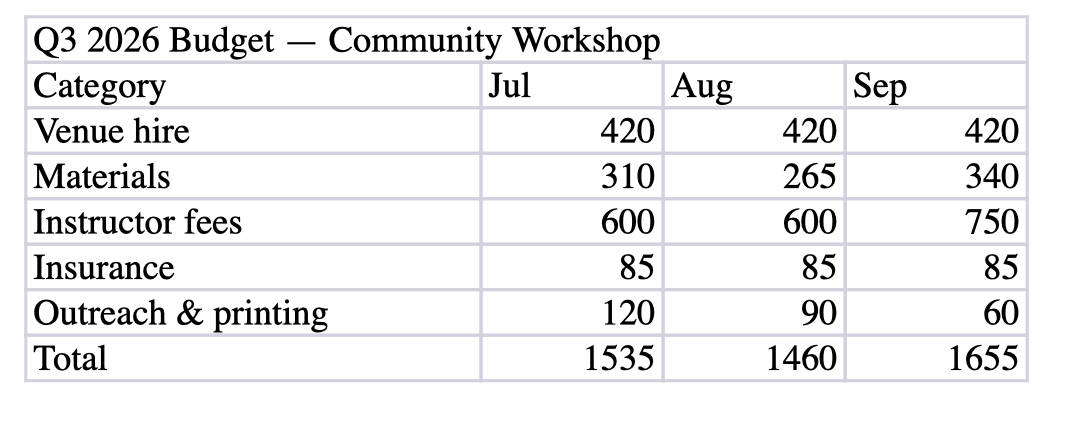
## Budget

| Q3 2026 Budget — Community Workshop |  |  |  |
| --- | --- | --- | --- |
| Category | Jul | Aug | Sep |
| Venue hire | 420 | 420 | 420 |
| Materials | 310 | 265 | 340 |
| Instructor fees | 600 | 600 | 750 |
| Insurance | 85 | 85 | 85 |
| Outreach & printing | 120 | 90 | 60 |
| Total | 1535 | 1460 | 1655 |

## Attendance

| Workshop | Seats | Attended | Waitlist |
| --- | --- | --- | --- |
| Intro woodworking | 12 | 12 | 5 |
| Bike repair basics | 10 | 8 | 0 |
| Sewing machine 101 | 12 | 11 | 3 |
| Home electrics safety | 16 | 14 | 2 |
- ✓Real GFM pipe tables with every value in the right cell — this output pastes into GitHub, Obsidian or a prompt and just works.
- ✓Each sheet becomes its own ## section, so multi-sheet workbooks stay organized.
- ✓Formula cells export their computed value (the Total row is the SUM results), which is what a reader of the Markdown wants.
- ⚠The merged title cell becomes an ordinary first row padded with empty cells — merge information has no Markdown equivalent.
- ⚠You get values, not formulas; charts, pivot tables and cell formatting aren't represented.
The showcase case: if your data lives in a spreadsheet, this is the conversion to lean on.
recommended setup › Standard Parsyra run — tables come out as tables, with no extra options needed.
Quantitative note with LaTeX math (.md)
A growth-review note whose formulas are written as TeX so they stay reviewable in version control. Markdown in, Markdown out — the interesting part is what the math survives as, and what our editor can then do with it.
# Sizing an A/B Test

Notes for the growth review. The formulas are written as TeX so they stay reviewable in version control.

## Confidence interval for a conversion rate

With $n$ visitors and $k$ conversions the point estimate is $\hat{p} = k/n$, and the normal-approximation interval at level $1-\alpha$ is

$$\hat{p} \pm z_{1-\alpha/2} \sqrt{\frac{\hat{p}(1-\hat{p})}{n}}$$

The approximation is reasonable once $n\hat{p} \geq 10$ and $n(1-\hat{p}) \geq 10$; below that use the Wilson interval instead.

## Required sample size

To detect an absolute lift of $\delta$ with power $1-\beta$, each arm needs roughly

$$n \approx \frac{2\bar{p}(1-\bar{p})\left(z_{1-\alpha/2} + z_{1-\beta}\right)^2}{\delta^2}$$

where $\bar{p}$ is the pooled rate. For $\bar{p} = 0.12$, $\delta = 0.02$, $\alpha = 0.05$ and $\beta = 0.2$ this gives about 4,150 visitors per arm.

## Why the test ran long

Traffic split unevenly for the first four days, so the effective $n$ was closer to the smaller arm than to the total. The variance term $\sqrt{\hat{p}(1-\hat{p})/n}$ shrinks with $\sqrt{n}$, so halving usable traffic costs roughly $\sqrt{2}$ in interval width.# Sizing an A/B Test
Notes for the growth review. The formulas are written as TeX so they stay reviewable in version control.
## Confidence interval for a conversion rate
With $n$ visitors and $k$ conversions the point estimate is $\hat{p} = k/n$, and the normal-approximation interval at level $1-\alpha$ is
$$\hat{p} \pm z_{1-\alpha/2} \sqrt{\frac{\hat{p}(1-\hat{p})}{n}}$$
The approximation is reasonable once $n\hat{p} \geq 10$ and $n(1-\hat{p}) \geq 10$; below that use the Wilson interval instead.
## Required sample size
To detect an absolute lift of $\delta$ with power $1-\beta$, each arm needs roughly
$$n \approx \frac{2\bar{p}(1-\bar{p})\left(z_{1-\alpha/2} + z_{1-\beta}\right)^2}{\delta^2}$$
where $\bar{p}$ is the pooled rate. For $\bar{p} = 0.12$, $\delta = 0.02$, $\alpha = 0.05$ and $\beta = 0.2$ this gives about 4,150 visitors per arm.
## Why the test ran long
Traffic split unevenly for the first four days, so the effective $n$ was closer to the smaller arm than to the total. The variance term $\sqrt{\hat{p}(1-\hat{p})/n}$ shrinks with $\sqrt{n}$, so halving usable traffic costs roughly $\sqrt{2}$ in interval width.- ✓Every delimiter survives untouched: inline $\hat{p}$ and display $$\ldots$$ blocks come out byte-identical to the source, so the math still compiles wherever you paste it.
- ✓Nothing is escaped on this path. Backslashes stay single and subscripts keep their braces, which is the difference between a formula that typesets and one that renders as literal characters.
- ✓Rendered above by the same KaTeX pipeline the Markdown editor uses — the formulas you see are produced from the output panel's text, not from a picture.
- ⚠Math written inside an HTML page does not fare as well. Converting the same note as .html escapes the TeX — \hat becomes a double backslash and z_{...} gains a backslash before the underscore — which breaks it until you unescape. Prefer a Markdown source when the maths matters.
- ⚠Typesetting the formulas is a Pro feature of the editor. The Markdown itself is free and renders in any tool with KaTeX or MathJax support.
- ⚠A PDF of this note would not convert nearly as well — see the Math paper tab, where equations from a text-layer PDF arrive as scattered glyphs.
Markdown in, Markdown out, with the maths intact — the cleanest path for anything equation-heavy.
recommended setup › Standard Parsyra run to convert. Typesetting the result, as shown above, is a Pro feature of the Markdown editor.
Engineering note with Mermaid diagrams (.html)
A design note that keeps its diagrams two ways: two Mermaid definitions written as code, and the same flowchart exported as a PNG. Diagram-as-code and diagram-as-picture behave very differently in conversion, and this sample shows both in one file.
<article>
<h1>Sync Architecture Note</h1>
<p>How a note travels from an offline edit to a merged document. The
diagram below is kept in the repository as Mermaid source so it can be
reviewed in a pull request like any other code.</p>
<h2>Merge flow</h2>
<pre><code class="language-mermaid">flowchart TD
A[Offline edit] --> B{Has remote changed?}
B -->|No| C[Fast-forward]
B -->|Yes| D[Field-level merge]
D --> E{Conflict?}
E -->|No| F[Write merged note]
E -->|Yes| G[Queue for review]
C --> F</code></pre>
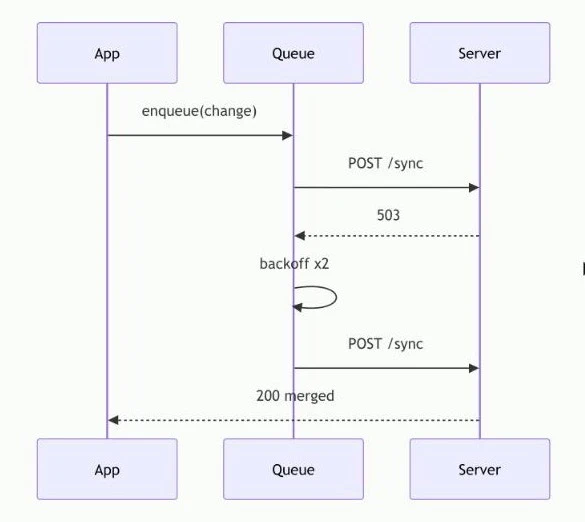
<h2>Retry timing</h2>
<pre><code class="language-mermaid">sequenceDiagram
participant App
participant Queue
participant Server
App->>Queue: enqueue(change)
...</code></pre>
<h2>The same flow as a picture</h2>
<figure>
<img src="diagram.png" alt="Rendered flowchart of the merge path">
<figcaption>Figure 1 — the merge path, exported as PNG.</figcaption>
</figure>
... Sync Architecture Note
# Sync Architecture Note
How a note travels from an offline edit to a merged document. The diagram below is kept in the repository as Mermaid source so it can be reviewed in a pull request like any other code.
## Merge flow
```mermaid
flowchart TD
A[Offline edit] --> B{Has remote changed?}
B -->|No| C[Fast-forward]
B -->|Yes| D[Field-level merge]
D --> E{Conflict?}
E -->|No| F[Write merged note]
E -->|Yes| G[Queue for review]
C --> F
```
## Retry timing
```mermaid
sequenceDiagram
participant App
participant Queue
participant Server
App->>Queue: enqueue(change)
Queue->>Server: POST /sync
Server-->>Queue: 503
Queue->>Queue: backoff x2
Queue->>Server: POST /sync
Server-->>App: 200 merged
```
## The same flow as a picture

Figure 1 — the merge path, exported as PNG for the slide deck.
## Notes
* Mermaid source lives beside the prose, so diagram changes show up in review diffs.
* The exported PNG is generated from the same source and is never edited by hand.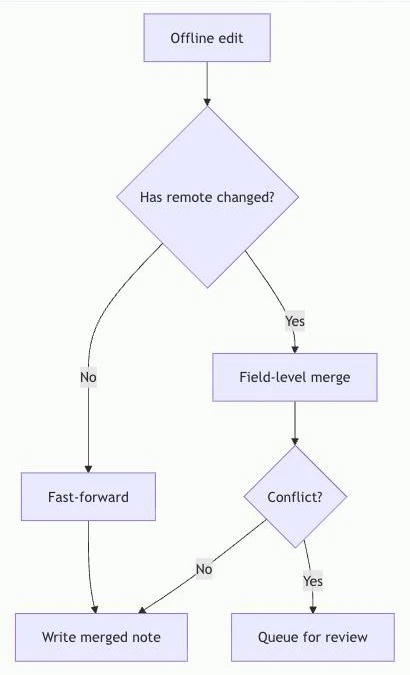
- ✓Both Mermaid blocks come through as ```mermaid fenced code, language tag intact — so GitHub, Obsidian and this site's own Markdown editor all render them as diagrams rather than printing the source.
- ✓The arrow syntax survives exactly. In the HTML source every arrow is stored as an escaped entity, and conversion decodes each one back to a real Mermaid arrow — which matters because a single mangled arrow turns a whole graph into a syntax error.
- ✓Indentation inside each block is preserved, so nested branches and sequence participants stay valid — the diagrams above are drawn live in your browser from the very Markdown in the output panel, not pasted in as pictures.
- ⚠The exported PNG becomes a plain image reference, , pointing at a relative path — the picture itself is not embedded, so the link only resolves if you keep the file beside the Markdown.
- ⚠A diagram that exists only as a picture stays a picture. Nothing reverse-engineers a flowchart image back into Mermaid source, here or on the OCR path.
- ⚠The page title leaks in as a stray first line above the heading — the same quirk the Webpage sample shows, since both come through the HTML path.
If your diagrams live as Mermaid source, they convert perfectly and stay drawable — the strongest argument for keeping diagrams as code rather than as exported images.
recommended setup › Standard Parsyra run to convert. Rendering the diagrams, as shown above, is a Pro feature of the Markdown editor; the fenced source itself is free and renders anywhere that supports Mermaid.
Which Setup Fits Which Job
The converter deliberately has few knobs. These are the setups behind the Parsyra conversion examples above, and when to reach for each one.
Default server run
What every example on this page used unless noted: drop the file, read the result. The current converter sends supported files to the self-hosted Parsyra service for temporary processing. Best for DOCX, XLSX, CSV, HTML and digital-born single-column PDFs.
AI OCR for scans and math
The high-accuracy path for scanned PDFs. When a PDF has no usable text layer the widget flags it and offers OCR; it rebuilds tables that ordinary text extraction flattens and returns equations as LaTeX — compare the two maths tabs in the gallery to see the difference. Requires sign-in: 10 pages a month free, 500 on Pro.
Tables: start from the source
The financial-report example shows why: PDF tables arrive as text lines, spreadsheet tables arrive as pipe tables. If the numbers exist in XLSX or CSV anywhere upstream, convert that file and skip the PDF entirely. Paste-a-table mode does the same for data on your clipboard.
Heading to Obsidian
The Markdown body is standard GFM, so it drops into a vault untouched. The Export to Obsidian button additionally writes source, date and tag front-matter and a vault-safe filename. Tables from Excel and webpages render in Obsidian exactly as shown above.
Heading to GitHub
Output is GitHub-Flavored Markdown already — pipe tables, fenced code blocks and blockquotes in the examples above render on GitHub without changes. Copy the result straight into a README or an issue; there is no separate mode to configure.
How These Parsyra Conversion Examples Were Produced
A quality page is only useful if you can trust its samples. Here is how these Parsyra conversion examples were produced — dull on purpose, so you could repeat it yourself and get the same bytes. Samples produced 30 July 2026.
We Authored the Inputs
Every input file was written for this page — a memo, a results summary, a delivery note, a maths handout, a blog post, an architecture note, a deck and a workbook — so there are no copyright questions and nothing was cherry-picked from files we knew would convert well. The generator scripts live in the site's repository.
One Run Through the Real Converter
Each file went through the public widget exactly once — the same code path you get, not a lab build. The three scanned samples used High-accuracy OCR; every other file used the default server run with no extra options.
Output Pasted Verbatim
What you see in each output panel is the copied result of that run. We fixed nothing: the flattened financial tables, the exploded equations and the collapsed PPTX table are all shown as they came out, because that is the information you actually need before trusting a converter.
Then We Annotated
The strengths and limitations under each example are our reading of the output, written after the fact. Where a weakness has a workaround — spreadsheet sources for tables, OCR for scans and columns — the annotation says so instead of hiding the weakness.
Parsyra Conversion Examples — Questions
What these samples do and don't prove, and how to reproduce them.
Are these Parsyra conversion examples really unedited?
Yes. Each output panel is the verbatim clipboard result of one conversion run — including the failures. The financial tables arrive as loose lines rather than a grid, the equations in the maths handout fall apart into scattered glyphs, and the slide table collapses to one value per line, all on public display. The only editorial act anywhere on the page is annotation around the output, never changes inside it.
Why show examples where the converter does badly?
Because you'll find out anyway, five minutes after you rely on it. Showing the flattened PDF tables here costs us a little polish and saves you a surprise. It also makes the good cases believable: when the Excel example says every value lands in the right cell, you know that claim survived the same no-retouching rule as the failures did.
Can I reproduce these results myself?
Yes, and we'd encourage it. The sample files and the scripts that generate them are committed to the site's repository, and the converter on the homepage is the same code that produced these outputs. Author a similar file, run it through, and compare — same input, same bytes out.
Why do PDF tables come out as text lines instead of Markdown tables?
A PDF stores a table as ruled lines plus positioned glyphs; nothing in the format marks where a cell begins or ends. Tools that promise perfect grids from that are guessing from pixel coordinates, and the guess eventually shifts a column silently. We'd rather hand you correct text than a confident wrong table — and point you at the spreadsheet source or AI OCR when the grid itself matters.
Can it convert equations to LaTeX?
Through High-accuracy OCR, yes, and the two maths tabs in the gallery show both sides of it. The standard Parsyra PDF path reads a text layer where an equation is stored as scattered positioned glyphs, so subscripts and summation bounds break onto their own lines — no tool reading that layer can reassemble them reliably. Reading the rendered page visually instead returns proper LaTeX in dollar delimiters. Because that route is offered only for PDFs with no text layer, a born-digital paper has to be flattened to an image first.
What do the AI OCR examples add?
Two of the Parsyra conversion examples in the gallery use the high-accuracy OCR path, and each answers a different doubt. The scanned delivery note rebuilds a table that ordinary text extraction flattens into text lines; the maths handout appears twice, converted normally and then with visual OCR, where the equations return as real LaTeX. Reading the rendered page rather than a text layer is what makes both possible. The path is metered at 10 pages a month free and 500 on Pro.
Do I need an account to get the results shown here?
Most examples on this page use the standard Parsyra conversion path. The scanned tabs use High-accuracy OCR, which is metered at 10 pages a month on the Free tier and 500 on Pro.
My file converted worse than these examples. Why?
Most likely your input carries less structure than the sample did. The examples show the pattern: HTML and XLSX convert almost perfectly because structure is in the file; PDFs degrade as layout complexity rises; scans may yield little or no text until you turn on High-accuracy OCR. Check whether your PDF has a selectable text layer, whether it's multi-column, and whether the data exists in a structured format upstream — that diagnosis covers nearly every disappointing result.
Dig deeper into a specific format: PDF, Excel, PowerPoint, Word, web pages, or scanned files via image to Markdown.